Drop In.
Get Markdown.
Convert PDF, Word, Excel, PowerPoint and more to clean, AI-ready Markdown.
Fewer tokens per request, lower API cost.
Runs locally on Windows.
No cloud upload. No subscription.
Requires a license key on first launch, no trial version.
PDF · Word · Excel · PowerPoint · EPUB · HTML · CSV · JSON · XML · TXT · ZIP · Markdown

You need Markdown.
Your tools make it harder than it should be.
This matters even more now that AI tools run on it. Markdown is the format ChatGPT, Claude and RAG pipelines read best, clean headings, clean lists, clean tables, and dramatically fewer tokens than raw PDF or Word content. Getting there should not be the hard part.
-
Web converters upload your documents to someone else's server. Contracts, research, client work. All of it leaving your machine.
-
Pasting from PDF or Word into ChatGPT or Claude produces garbled formatting. Tables break. Headings disappear. You spend more time cleaning than working.
-
Command-line tools require Python, dependencies and a terminal. That's a setup nobody has time for.
-
Most tools handle one format. You have five different ones.
"I just want to drop my file in and get clean Markdown out.
Without uploading it to some server I've never heard of."
That is not a projection. That is Harry's own library: 39 GB of PDFs and EPUBs, converted to 456 MB of Markdown with Markdown Drop.
A PDF carries layout, fonts and formatting an AI model never needed. Markdown carries only the text and structure it actually reads. Fewer tokens per document means lower API cost per request. One person converting a research library saves megabytes. A 200-person team running documents through AI every single day saves real money on the API bill, every month.
Compact structure,
not file baggage.
A PDF lives on layout, fonts and embedded elements. A language model needs none of that. It needs text, headings and structure, exactly what Markdown delivers, with no detour and no unnecessary weight.
The result: smaller requests to AI models, lower cost, and better quality answers. Markdown Drop turns that idea into an app that prepares any file in seconds.
Schematic example for one large document. The exact number depends on the file, the direction is always the same.
Same document.
Two completely different outcomes.
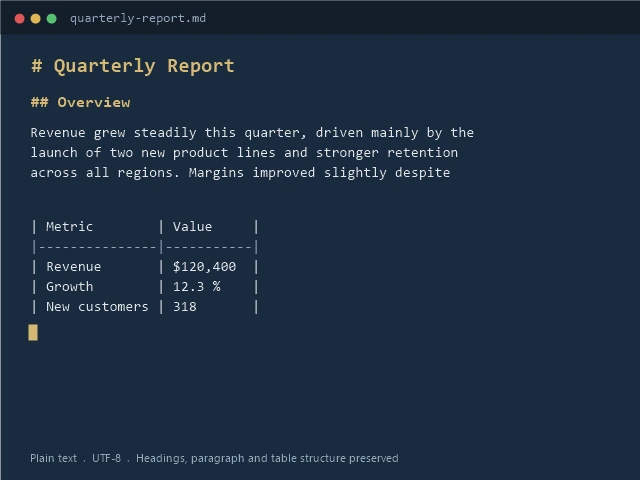
This is what a Word document looks like before and after Markdown Drop. No cleanup needed afterward.

Every byte stays on your computer.
Web converters upload your files.
Markdown Drop does not.
When you use an online converter, your document travels to a server you do not control. Contracts, research notes, client data. It all leaves your machine. Markdown Drop runs entirely on your Windows PC. There is nothing to upload.
-
No account needed.
Only your license key is registered.
No profile, no login, no tracking. -
No telemetry.
Markdown Drop does not report what you convert or how often you use it. -
Works offline.
After activation, there is no network requirement at all. -
Compliant by default.
Local processing means no GDPR headaches for documents you handle professionally.
Built on Microsoft MarkItDown.
Markdown Drop wraps Microsoft's open-source conversion engine in a clean Windows interface. Proven quality, not a homemade parser.
Local app.
No upload, no terminal, no subscription.
| Markdown Drop | Web / Cloud Converters | Command-Line Tools | |
|---|---|---|---|
| Your files leave your device | Never | Always | Never |
| Setup required | One installer | None | Python, dependencies, terminal |
| Batch and folder conversion | Yes, recursive | Rarely | Scriptable, manual setup |
| Pricing | $9.99 once | Often monthly subscription | Free, but your time isn't |
| Works fully offline | Yes | No | Yes |
Three steps. That is it.
Drop or select your file
Drag any document into the app, or click to browse. Select one or more entire folders too, subfolders are scanned automatically. PDF, Word, Excel, PowerPoint and more. Mix formats freely.
Click Convert
One click. Markdown Drop processes everything on your machine. No waiting for a server. No upload. Nothing leaves your computer.
Get clean Markdown
Your .md files land in the same folder or your chosen output directory. Open them in any editor or paste straight into ChatGPT, Claude, or Notion.
Everything you need. Nothing you don't.

Runs completely offline
After a one-time license activation, Markdown Drop works without an internet connection. Your files stay on your machine. Always.

12 formats supported
PDF, Word, Excel, PowerPoint, EPUB, HTML, CSV, JSON, XML, plain text, ZIP archives and Markdown passthrough. One tool handles them all.

Batch conversion
Drop multiple files at once, or convert an entire project folder in one run. Markdown Drop handles hundreds of files without slowing down.

Custom output folder
Choose exactly where your Markdown files are saved. Same folder as the source, a dedicated output path, or anywhere you like.

Smart folder import
Select multiple folders at once with Ctrl-click, just like in Windows Explorer. Turn on subfolder scanning and Markdown Drop searches up to 3 levels deep, handy after unzipping a nested archive.

One-time price
Buy once, use forever. No subscription that quietly charges you every month. Your license never expires.
12 formats. One tool.
From common office formats to structured data.
Markdown Drop handles them all in one place.
Drop, convert, done.
A full drag-and-drop conversion, start to finish, no cuts.
"I work with documents and AI tools every day.
I built Markdown Drop because I needed it myself, not to sell you a subscription."
Simple. Honest. One-time.
Markdown Drop for Windows
First 100 licenses only. Regular price $14.99 afterward.
- Full Markdown Drop license
- Windows 10 and 11, 64-bit
- Install on up to 3 devices
- All 12 supported formats
- Batch and recursive folder conversion
- All future updates included
- Personal and commercial use
Secure checkout. Your license key is delivered instantly by email.
Doesn't run on your system, or need licenses for a team?
Contact us
we'll fix it, refund it, or sort out team pricing.
What buyers say
Markdown Drop just launched.
Be the first to leave a review once you have tried it.
Already own a license? Leave a review.
Already have a license?
Get the installer.
Download Markdown Drop for Windows. Run the installer, enter your license key on first launch and you are ready to convert.
Markdown Drop 1.1
Windows Installer · 80 MB
Download InstallerRequires a license key on first launch. No license yet? Get one above.
The installer is digitally signed by Harry Siegmund.
SHA-256 of the installer file inside the zip:C58591B3F37DE55C8C056E572F847E19F64C067018294B03CD6B3427CDC8F558
Found a security issue?
Report it to Contact us and we will confirm receipt and keep you updated while we investigate. Full disclosure process and contact details: Cyber Resilience Act page.
Security updates for Markdown Drop 1.x are provided for at least 5 years from the initial release date (August 2026).
Questions and Answers
Stop uploading your documents.
Start converting locally.
$9.99 once. Windows 10 and 11. No subscription. No cloud. No nonsense.